Free language flashcard decks, A1 to C2, ready to import into TurnCards.
The easiest way to add a deck is inside the app: Decks → Deck Library.
You can also download any deck below as a .flashdeck file (plain JSON): tap the
circle, then in TurnCards go to Decks → Import → Files and choose the file. New decks are added regularly — check back for more
languages and subjects.
📚 Browse by language. Every language below runs from A1 to C2 —
core vocabulary, verb packs, real-life situations, connectors and opinions, debate and
formal writing, idioms, professional phrases, and topic decks for travel, food, work and
health. Every card has an example sentence. Subject decks for
Chemistry and Geography are further down the page.
🇮🇹 Italian
A1Italian Essentials
Free taster — 32 starter words, all included in Core Vocab A1.
512 more B1 words across work, health, housing & paperwork, travel, feelings, media, and relationships. Adds to B1 Core Vocab — no overlap. Levels cross-checked against CILS B1/B2 word lists.
323 more B2 words across society, politics, economy, environment, science, culture, and debate. Adds to B2 Core Vocab — no overlap. Levels cross-checked against CILS B1/B2 word lists.
60 words and phrases, grouped by situation: ordering in restaurants, dietary needs, tastes, cooking, and food shopping. Example sentence on every card.
60 words and phrases, grouped by situation: job hunting, the office, meetings, email phrases, contracts, and daily work life. Example sentence on every card.
60 words and phrases, grouped by situation: symptoms, the doctor and pharmacy, emergencies, the body, and healthy habits. Example sentence on every card.
406 more B1 words across work, health, housing & paperwork, travel, feelings, media, and relationships. Adds to B1 Core Vocab — no overlap. Levels checked against the Instituto Cervantes Plan Curricular.
275 more B2 words across society, politics, economy, environment, science, culture, and debate. Adds to B2 Core Vocab — no overlap. Levels checked against the Instituto Cervantes Plan Curricular.
60 words and phrases, grouped by situation: ordering in restaurants, dietary needs, tastes, cooking, and food shopping. Example sentence on every card.
60 words and phrases, grouped by situation: job hunting, the office, meetings, email phrases, contracts, and daily work life. Example sentence on every card.
60 words and phrases, grouped by situation: symptoms, the doctor and pharmacy, emergencies, the body, and healthy habits. Example sentence on every card.
436 more B1 words across work, health, housing & paperwork, travel, feelings, media, and relationships. Adds to B1 Core Vocab — no overlap. Levels from the official French reference levels (Beacco, via FLELex).
396 more B2 words across society, politics, economy, environment, science, culture, and debate. Adds to B2 Core Vocab — no overlap. Levels from the official French reference levels (Beacco, via FLELex).
60 words and phrases, grouped by situation: ordering in restaurants, dietary needs, tastes, cooking, and food shopping. Example sentence on every card.
60 words and phrases, grouped by situation: job hunting, the office, meetings, email phrases, contracts, and daily work life. Example sentence on every card.
60 words and phrases, grouped by situation: symptoms, the doctor and pharmacy, emergencies, the body, and healthy habits. Example sentence on every card.
60 words and phrases, grouped by situation: ordering in restaurants, dietary needs, tastes, cooking, and food shopping. Example sentence on every card.
60 words and phrases, grouped by situation: job hunting, the office, meetings, email phrases, contracts, and daily work life. Example sentence on every card.
60 words and phrases, grouped by situation: symptoms, the doctor and pharmacy, emergencies, the body, and healthy habits. Example sentence on every card.
Roughly JLPT N3 — 120 high-frequency words in kana and romaji spanning work, health, housing & bureaucracy, travel, feelings, plans, media, and relationships.
10 core verbs in plain and polite negative-past ("didn't do"), volitional ("let's/I will"), and potential ("can do") forms — the key N4–N3 grammar points.
60 words and phrases, grouped by situation: ordering in restaurants, dietary needs, tastes, cooking, and food shopping. Example sentence on every card.
60 words and phrases, grouped by situation: job hunting, the office, meetings, email phrases, contracts, and daily work life. Example sentence on every card.
60 words and phrases, grouped by situation: symptoms, the doctor and pharmacy, emergencies, the body, and healthy habits. Example sentence on every card.
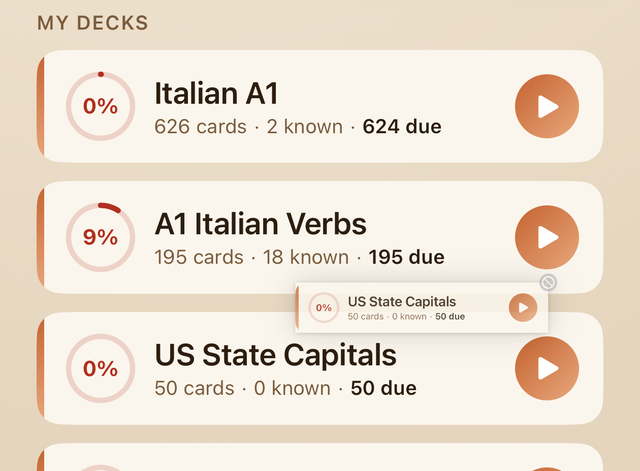
On the home screen, touch and hold a deck card, then drag it up or down to reorder
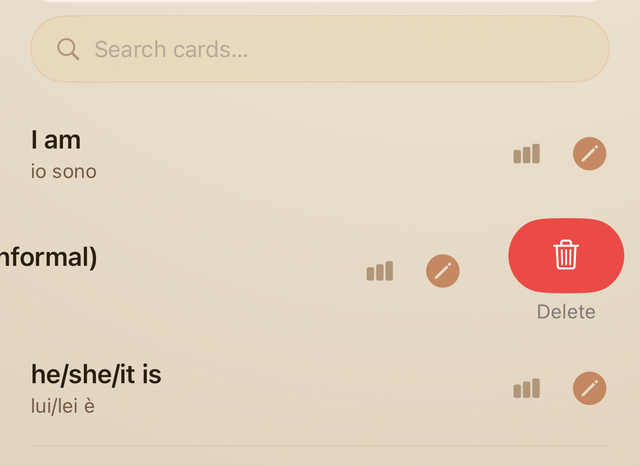
your deck list. To edit or delete cards — or to delete a deck entirely — open the
deck first: tap the pencil on any card to edit it, swipe a card left to delete it,
or tap ••• at the top of the deck and choose Delete Deck.
Touch and hold a deck, then drag to reorder.Inside a deck: edit, swipe, or use ••• to delete.
Enhance a deck with AI
Any deck — whether you downloaded it here, imported it from Anki, or built it
yourself — can be enhanced automatically using Apple Intelligence on your device.
Open the deck, tap ••• in the top-right corner, and choose
Enhance with AI.
TurnCards will generate example sentences for every card and suggest topic tags,
all on-device without sending your data anywhere. Example sentences unlock two
additional study modes — Sentence Fill and Mixed — so a bare word-list deck
becomes a full practice set in seconds.
Requires Apple Intelligence. Available on iPhone 15 Pro and later,
and all iPhone 16 models, running iOS 18.1 or later.
Spaced repetition & Known cards
TurnCards tracks how well you know each card across sessions. Cards you answer
correctly are spaced further apart; cards you struggle with come back sooner.
When you've truly mastered a card you can mark it as Known —
it moves to a separate list and stops appearing in regular study sessions so
you can focus on what still needs work.
To review your Known cards, tap Known in the home screen stats
bar. To reset a card back into rotation, open it and tap Mark as learning.
Share a deck
You can share any deck you've built or customised directly from the app — no export
step needed. Open the deck, then tap the share icon (↑) in the top-right
corner. iOS will open the standard share sheet so you can send the deck via
AirDrop, Messages, Mail, or save it to Files.
The deck is sent as a .flashdeck file that contains every card, your
language settings, and any example sentences you've added. When the recipient taps
the file on their iPhone or iPad, TurnCards opens automatically and the deck is
imported in one tap — no account or sign-in required.
Great for teachers and tutors: build a custom vocabulary list for a
class or student, tap share, and everyone gets an identical, ready-to-study deck
in seconds.
Make your own
Don't see what you need? TurnCards can import any deck in
.flashdeck, .json, .csv, .tsv,
or .apkg (Anki package) format. Anki .apkg files are
converted automatically — just pick the file from the import screen, no Anki
Desktop export required. See the in-app Import screen for CSV/TSV column format,
or build a deck from any frequency-word list.
Contact
Have a deck you'd like to share with other TurnCards users? Email
[email protected].